Have an account?
Showing posts with label Internet. Show all posts

Gudang Penyimpanan Online

Membuat backup data di portable hard drive, flash disk, cd atau pun dvd tentu sudah sering dilakukan. Untuk data yang dianggap sangat penting ada baiknya Anda mempertimbangkan untuk menyimpan data tersebut secara online. Dengan menyimpan data secara online Anda dapat mengakses data tersebut dari mana saja tanpa perlu selalu membawa flash disk. Anda juga tidak perlu khawatir kehilangan data karena virus atau pun karena media penyimpan yang rusak.

Berikut ini adalah beberapa situs yang menyediakan layanan penyimpanan data secara online:
1.  Mozy.com
    Mozy.com menawarkan tempat penyimpanan secara online dengan kapasitas 2GB untuk versi gratis. Dengan kapasitas sebesar itu Anda dapat menyimpan 200 file MP3 dan 300 foto. Fitur yang terdapat pada Mozy versi gratis adalah sebagai berikut:
  • Backup data secara otomatis atau berdasarkan jadwal
  • Enkripsi file pada saat proses backup data
  • Akses file dari desktop Windows maupun Macintosh
  • Kapasitas simpan sebesar 2 GB
Jika Anda merasa kapasitas sebesar 2GB tidak cukup Anda dapat melakukan upgrade. Dengan biaya sebesar $ 4.95 per bulan Anda mendapatkan kapasitas yang tidak terbatas.

2.  ZumoDrive.com
    ZumoDrive.com menawarkan kapasitas penyimpanan sebesar 1 GB untuk versi gratis. Untuk versi berbayar, ZumoDrive.com menawarkan beberapa pilihan paket yaitu mulai dari $2.99 per bulan untuk kapasitas 10 GB.

3.  ADrive.com
    ADrive.co menawarkan kapasitas penyimpanan yang cukup fantastis, yaitu sampai 50 GB. Lebih dari cukup kalau sekedar buat backup data penting Anda. Untuk versi gratis tidak support koneksi via FTP dan aplikasi desktop.

4.  Humyo.com
    Humyo.com menawarkan kapasitas penyimpanan sebesar 10GB yang dibagi menjadi dua, yaitu 5GB untuk media file dan 5GB lagi untuk non media file. Untuk versi gratis hanya dapat diakses melalui web. Humyo.com merupakan perusahaan yang satu grup dengan perusahaan antivirus TrendMicro sehingga dari segi reputasi tidak perlu diragukan lagi.

Sumber : www.klik-kanan.com

Yonoo Desktop = Facebook + Twitter + YM


Yoono is an easy to use application that allows you to connect to all your social networks and instant messaging services - in one place. Get all your friend updates, update your own status, and easily share stuff with your friends.

Mempercantik Tampilan Firefox Dengan "Personas"


Personas merupakan Firefox addon yang berfungsi untuk mempermudah Anda dalam mempercantik tampilan browser Firefox. Dengan menggunakan Personas dalam hitungan detik Anda sudah bisa mengganti dengan theme yang Anda sukai.
Anda dapat memilih ribuan theme pada halaman gallery Personas yang dibagi dalam beberapa kategori, misalnya Film & TV, Holiday, Music, Nature, Sport, dll. Kalau Anda tidak menemukan theme yang cocok Anda juga dapat membuatnya sendiri.

Untuk menggunakan Personas caranya cukup mudah. Pertama Anda harus mendownload dan menginstall dulu addonnya, setelah itu Anda tinggal memilih theme yang Anda sukai.
Jika Anda ingin mengganti theme, caranya klik icon Personas yang ada di pojok kiri bawah browser Firefox.

Gmail with Offline e-mail access

Significantly increasing the utility and competitiveness of its Web-based e-mail service, Google is enabling an experimental ability to read, write, and search Gmail messages even while not connected to the network.

Google believes almost religiously in cloud computing, the idea that computer applications and data live on the Internet rather than on PCs. But there are times when the network is inaccessible, and generally Web-based applications like today's Gmail effectively seize up under those circumstances.

Offline sidesteps that problem, the classic example being a busy executive traveling on a plane. And offline Gmail access begins a new chapter for Google's ambition to appeal to business customers for services such as Google Apps, of which Gmail is a component.

What Is WiFi?

A wireless network uses radio waves, just like cell phones, televisions and radios do. In fact, communication across a wireless network is a lot like two-way radio communication. Here's what happens:
  1. A computer's wireless adapter translates data into a radio signal and transmits it using an antenna.
  2. A wireless router receives the signal and decodes it. The router sends the information to the Internet using a physical, wired Ethernet connection.
The process also works in reverse, with the router receiving information from the Internet, translating it into a radio signal and sending it to the computer's wireless adapter.
The radios used for WiFi communication are very similar to the radios used for walkie-talkies, cell phones and other devices. They can transmit and receive radio waves, and they can convert 1s and 0s into radio waves and convert the radio waves back into 1s and 0s. But WiFi radios have a few notable differences from other radios:
  • They transmit at frequencies of 2.4 GHz or 5 GHz. This frequency is considerably higher than the frequencies used for cell phones, walkie-talkies and televisions. The higher frequency allows the signal to carry more data.
  • They use 802.11 networking standards, which come in several flavors:
    • 802.11a transmits at 5 GHz and can move up to 54 megabits of data per second. It also uses orthogonal frequency-division multiplexing (OFDM), a more efficient coding technique that splits that radio signal into several sub-signals before they reach a receiver. This greatly reduces interference.
    • 802.11b is the slowest and least expensive standard. For a while, its cost made it popular, but now it's becoming less common as faster standards become less expensive. 802.11b transmits in the 2.4 GHz frequency band of the radio spectrum. It can handle up to 11 megabits of data per second, and it uses complementary code keying (CCK) modulation to improve speeds.
    • 802.11g transmits at 2.4 GHz like 802.11b, but it's a lot faster -- it can handle up to 54 megabits of data per second. 802.11g is faster because it uses the same OFDM coding as 802.11a.
    • 802.11n is the newest standard that is widely available. This standard significantly improves speed and range. For instance, although 802.11g theoretically moves 54 megabits of data per second, it only achieves real-world speeds of about 24 megabits of data per second because of network congestion. 802.11n, however, reportedly can achieve speeds as high as 140 megabits per second. The standard is currently in draft form -- the Institute of Electrical and Electronics Engineers (IEEE) plans to formally ratify 802.11n by the end of 2009.
  • Other 802.11 standards focus on specific applications of wireless networks, like wide area networks (WANs) inside vehicles or technology that lets you move from one wireless network to another seamlessly.
  • WiFi radios can transmit on any of three frequency bands. Or, they can "frequency hop" rapidly between the different bands. Frequency hopping helps reduce interference and lets multiple devices use the same wireless connection simultaneously.

Save Bandwith Quota Limited


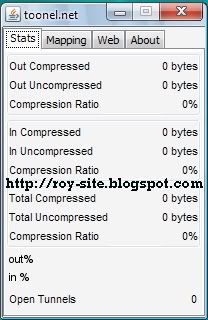
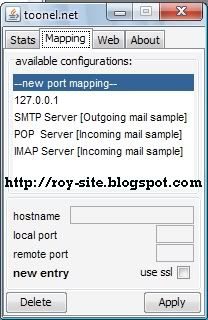
For those of you who subscribe to the Internet with the quota system (limited) it would be trying to save bandwidth usage quota owned. Way is often done to save bandwidth is to disable images, java, audio / sound, SVG animation on every browser used. But what if the facilities required, certainly not to re-activate it? There is another way that can be used to menhemat bandwidth, the compression system. With this system, each web page you visit will be compressed before displayed in the browser. This bandwidth-saving service toonel.net name.

In order to use this application, first have to install JAVA on your computer, please download here, while for toonel.net applications can be downloaded here. After the application is installed on your computer Java, toonel.net then run the application you've downloaded. Do not forget to change the browser's connection to the proxy manually, then fill the HTTP proxy to 127.0.01 and Port = 8080 Also keep in mind every time you browse the internet do not forget to run the application first Toonel.

IDM Free Download


Internet Download Manager has a smart download logic accelerator that features intelligent dynamic file segmentation and safe multipart downloading technology to accelerate your downloads. Unlike other download accelerators and managers that segment files before downloading starts, Internet Download Manager segments downloaded files dynamically during download process. Internet Download Manager reuses available connections without additional connect and login stages to achieve better acceleration performance. Internet Download Manager supports proxy servers, ftp and http protocols, firewalls, redirects, cookies, authorization, MP3 audio and MPEG video content processing. IDM integrates seamlessly into Microsoft Internet Explorer, Netscape, MSN Explorer, AOL, Opera, Mozilla, Mozilla Firefox, Mozilla Firebird, Avant Browser, MyIE2, and all other popular browsers to automatically handle your downloads. You can also drag and drop files, or use Internet Download Manager from command line. Internet Download Manager can dial your modem at the set time, download the files you want, then hang up or even shut down your computer when it’s done. Other features include multilingual support, zip preview, download categories, scheduler pro, sounds on different events, HTTPS support, queue processor, html help and tutorial, enhanced virus protection on download completion, progressive downloading with quotas (useful for connections that use some kind of fair access policy or FAP like Direcway, Direct PC, Hughes, etc.), built-in download accelerator, and many others. 

click here to download IDM.

How to add or Change Favicon in Blogger Blog?

Favicon is a small icon shown next to site URL in the address bar. In Blogger, by default orange colored blogger icon is shown as favicon. You can make your blog stand out by using your own customized icon

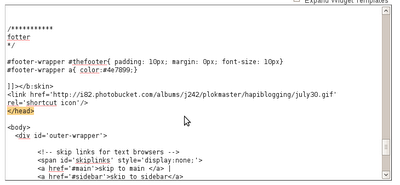
Adding a favicon in blogger is very easy, as easy as 1-2-3. You just to need the basic knowledge of changing your blogger template. All you need to do is to insert the following link code below in your template, between the head tag.


The Link Code


The Image URL
The image url is the web address of the image you are going to use as your favicon. It may either be in the following format: jpg, gif, or png. Since it is a web address, you need to upload it on a photo hosting site, Photobucket. Replace the {image url} with your exact image url.


The Head Tag
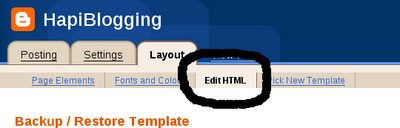
The head tag begins with this tag: and ends with this tag: . Go to Layout->Edit HTML.

Locate for end head tag () and paste your link code above it, then save it.


After saving, open your blog and you'll see the result. Is it really easy for you?
Good Luck...

Hemat Bandwith dengan Opera Mini


Buat Anda yang sering melakukan browsing menggunakan akses internet dengan sistem pembayaran volume base, maka melakukan browsing tentu harus lebih jeli. Bila tidak maka bandwith akan cepat habis. 
Kebanyakan browser yang digunakan PC atau Laptop lebih boros bandwith ketimbang bila menggunakan browser pada ponsel seperti Opera Mini. Lantas bagaimana bila mnggunakan Opera Mini pada PC atau notebook?

Untuk menggunakan Opera Mini pada PC, kita membutuhkan persyaratan seperti ini : 
  1. Pastikan PC atau Laptop anda terinstal sistem operasi yang support JRE. Bila belum terinstal, Anda bisa mendownloadnya  disini. 
  2. Pastkan anda punya koneksi internet, bisa nebeng atau pakai ponsel sebagai modem GPRS/EDGE. 
  3. Download MicroEmulator. 
  4. OperaMini.

Untuk download ebook kengkapnya klik disini.
Selamat Mencoba..

IP